Official TM SIM Registration Link
TM SIM users generally register through Globe/TM official registration channels or the GlobeOne app. For safety, avoid shortened links, fake Facebook pages, random SMS links, and any page asking for payment or unrelated wallet details.
Open Official SIM Registration Portal
Safety tip: Before entering personal details, check that the registration page belongs to Globe/TM and uses a secure connection.
What Is TM SIM Registration?
TM SIM registration is the process of linking a TM mobile number to verified subscriber information. It helps identify the SIM owner and supports safer mobile communication under SIM registration rules in the Philippines.
The usual process includes entering your TM number, verifying an OTP, submitting personal details, uploading a valid ID and selfie, reviewing your information, and saving the confirmation or reference number.
Quick Facts
Cost
Use official registration channels only. Avoid anyone asking for unofficial registration payment.
Methods
Official web portal, GlobeOne app, or authorized Globe/TM support channels.
Proof
Keep your reference number, confirmation SMS, or screenshot after registration.
TM SIM Registration Requirements
Prepare these details before starting the registration process:
- Active TM mobile number
- One-Time Password sent to your TM SIM
- Full legal name
- Birthday and nationality
- Complete address
- Valid government-issued ID
- Clear selfie for identity verification
Common accepted IDs
- PhilSys ID / National ID
- Passport
- Driver’s License
- SSS ID
- UMID Card
- Postal ID
- PRC ID
- Voter’s ID
- Senior Citizen ID
- PWD ID
For special cases
- Minors may need guardian details and consent.
- Foreign nationals may need passport and valid stay documents.
- Business entities may need business papers and authorization.
- Requirements can change, so verify on official channels.
How to Register TM SIM Online Through the Web Portal
- Open the official registration portal.
Use a browser on your phone or computer and avoid suspicious links from SMS or social media. - Enter your TM mobile number.
Double-check the number before requesting an OTP. - Verify the OTP.
Enter the One-Time Password sent to your TM SIM only on the official page. - Fill out your personal details.
Use the exact name, birthdate, and address details shown on your valid ID. - Upload ID and selfie.
Use clear, readable, well-lit images and avoid cropped or blurry photos. - Review your information.
Check spelling, address, ID type, and number before submitting. - Submit and save confirmation.
Keep the reference number or confirmation screenshot for future use.
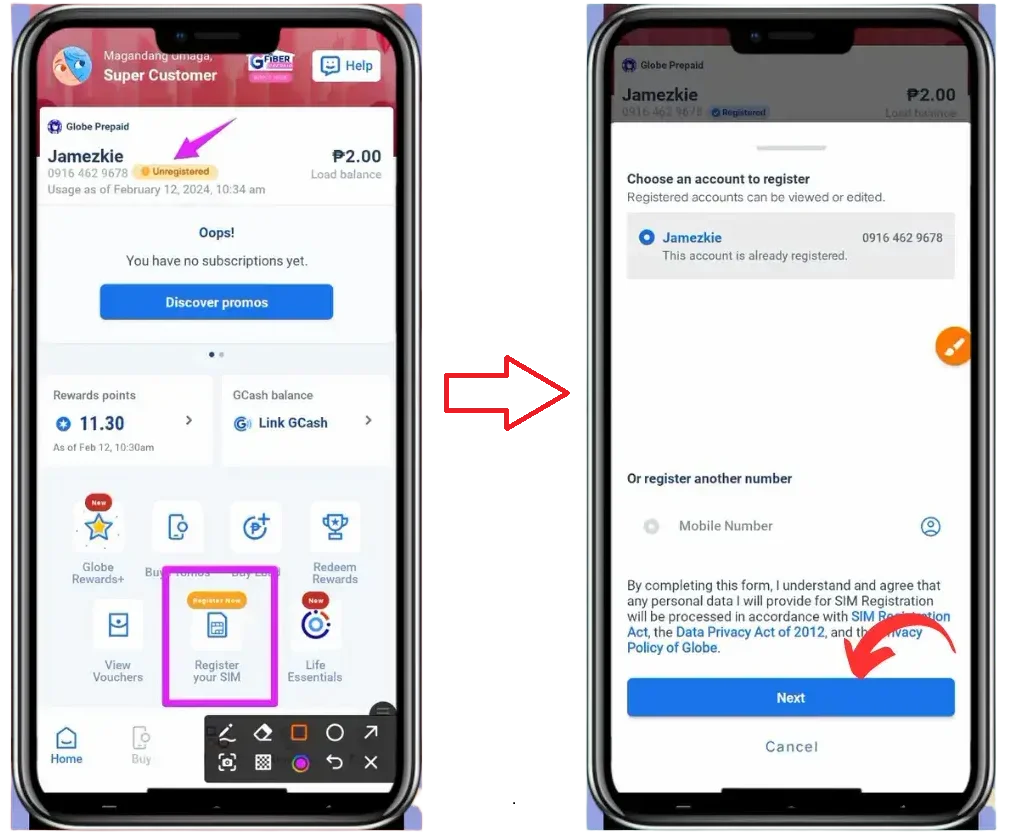
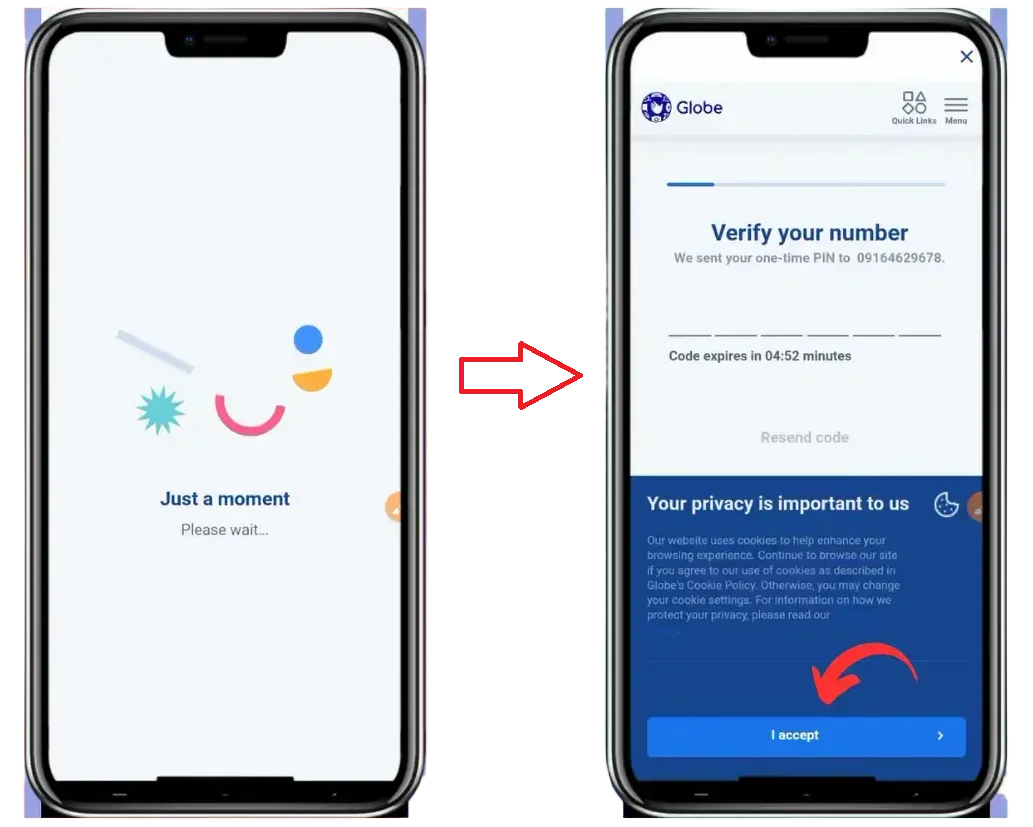
TM SIM Registration Through the GlobeOne App
TM users may also use the GlobeOne app for registration and status checking. Download the app only from the official app store for your device.
- Install or open GlobeOne.
Use Google Play Store or Apple App Store only. - Log in or create an account.
Use your TM number and complete OTP verification when requested. - Choose SIM registration.
Tap the SIM registration prompt or account-related registration option. - Enter personal information.
Complete the required fields using accurate details from your valid ID. - Upload ID and selfie.
Follow app instructions for clear photo capture. - Review and submit.
Save the reference number or confirmation details once registration is complete.
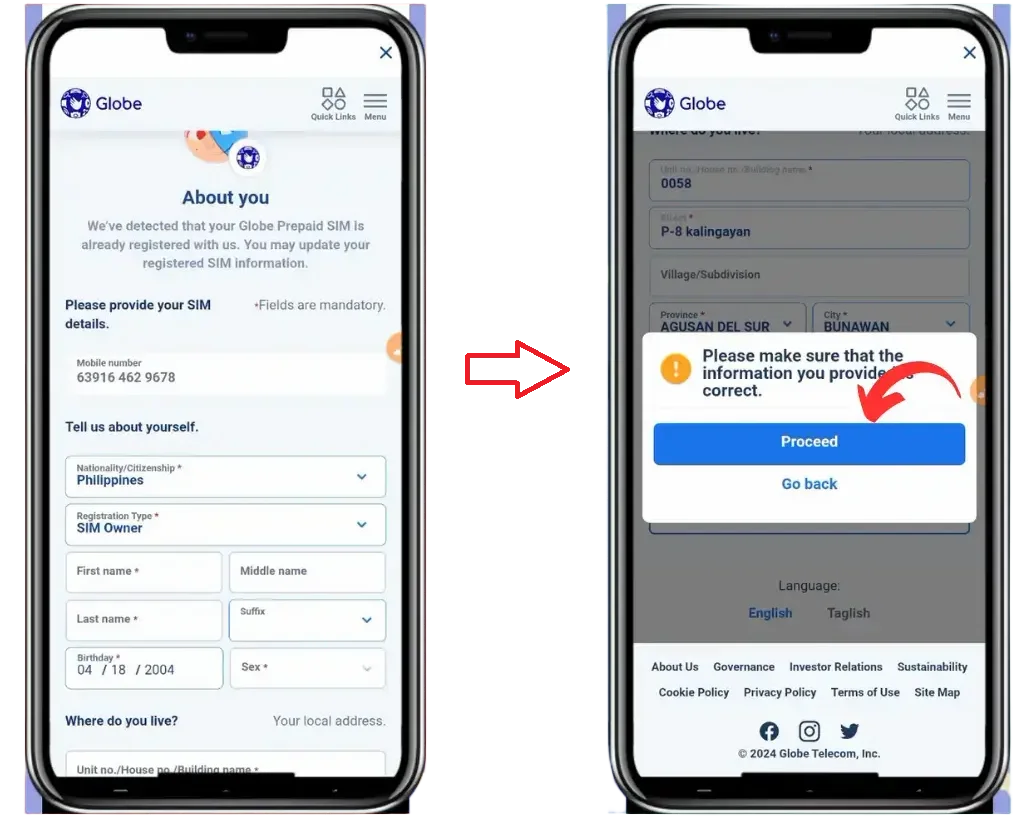
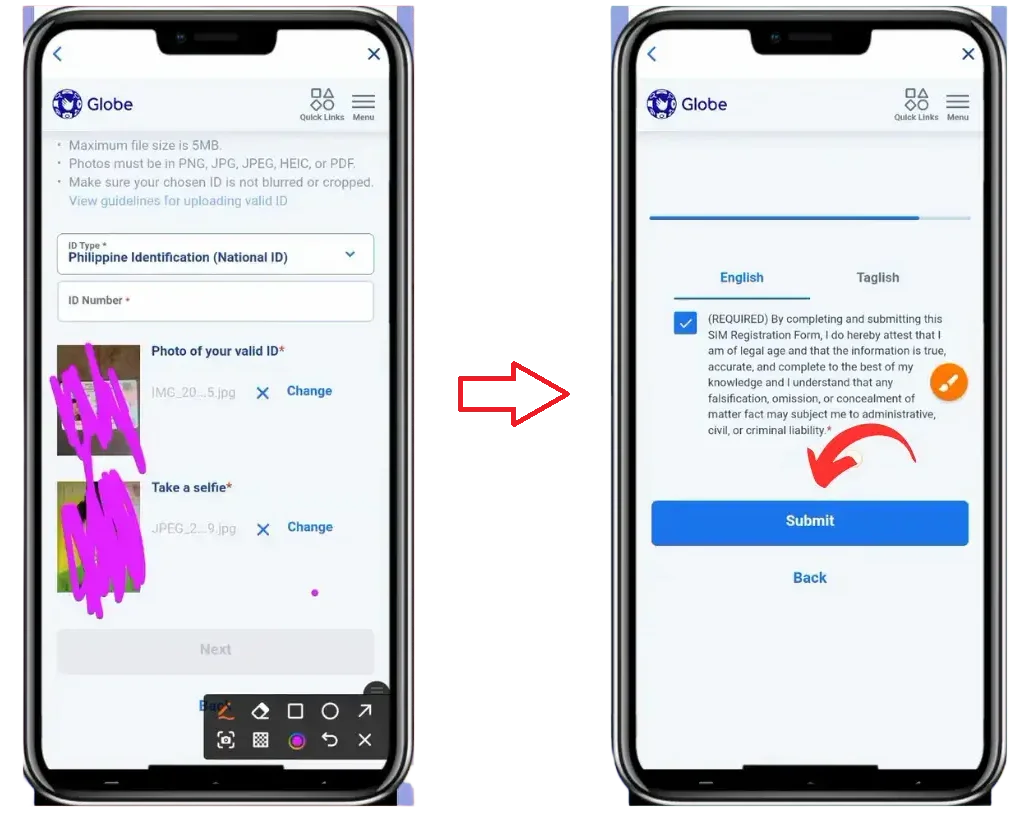
How to Check TM SIM Registration Status
After submission, check your registration status through official channels. This helps confirm whether the SIM is registered, pending, or still needs action.
Online portal
Enter your TM number, complete OTP verification, and follow the status message shown on the official page.
GlobeOne app
Log in with your TM number and check your account or SIM status section.
Store assistance
Bring a valid ID and ask an authorized Globe/TM representative to assist with status checking.
What to Do After TM SIM Registration
Save proof
Keep the reference number, confirmation SMS, or screenshot in a safe place.
Test your service
Check calls, texts, mobile data, and account access after registration.
Ask official support
Use official channels if OTP, verification, or activation issues continue.
Common TM SIM Registration Problems and Fixes
OTP Not Received
- Check that your TM number is entered correctly.
- Restart your phone and confirm signal strength.
- Wait before requesting a new OTP.
- Do not share OTP codes with anyone.
ID or Selfie Upload Failed
- Retake the photo in good lighting.
- Make sure the full ID is visible and readable.
- Use a supported file type if the form shows file restrictions.
- Reduce file size if the upload limit is exceeded.
Page or App Not Loading
- Try a different browser or clear cache.
- Use stable Wi-Fi or mobile data.
- Update the GlobeOne app.
- Try again later if the portal is busy.
TM Rewards and Promos After Registration
TM promos, rewards, and app offers can change over time. Instead of relying on old promo tables, check the latest available offers inside GlobeOne or official TM/Globe channels before subscribing.
| Where to Check | What You May Find | Safety Tip |
|---|---|---|
| GlobeOne app | Current rewards, points, promos, and account offers. | Use only the official app store version. |
| TM or Globe official pages | Updated promo mechanics, validity, price, and eligibility. | Read mechanics before subscribing. |
| SMS or in-app notices | Account-specific offers or alerts. | Do not click suspicious shortened links. |
TM SIM, GCash, and Account Safety
If your TM number is connected to GCash or other mobile accounts, keeping your SIM active and secure is important. Use official app settings and support channels for any account-specific verification, recovery, or linking questions.
Safety Tips to Avoid TM SIM Registration Scams
- Do not pay unofficial agents for registration help.
- Avoid shortened links from unknown senders.
- Never send OTPs, ID photos, selfies, or passwords through chat.
- Check the domain before uploading documents.
- Close any page asking for wallet PINs, banking details, or unrelated passwords.
Frequently Asked Questions
Is this website the official TM SIM registration page?
No. This is an independent information guide. Use official Globe/TM channels or GlobeOne to submit personal registration information.
Can I use GlobeOne to register a TM SIM?
TM registration may be available through GlobeOne or official registration channels. Follow the instructions shown in the official app or portal for your exact number.
What should I do if my OTP does not arrive?
Check signal, confirm your TM number, restart your phone, and request a new OTP after waiting. Use official support if the issue continues.
Should I save my registration reference number?
Yes. Save any confirmation message, screenshot, or reference number as proof that you completed the submission.
Final Thoughts on TM SIM Registration
Registering your TM SIM helps keep your mobile service active and supports safer mobile use. Use official channels, prepare clear documents, protect your OTP, and keep confirmation details after completing the process.